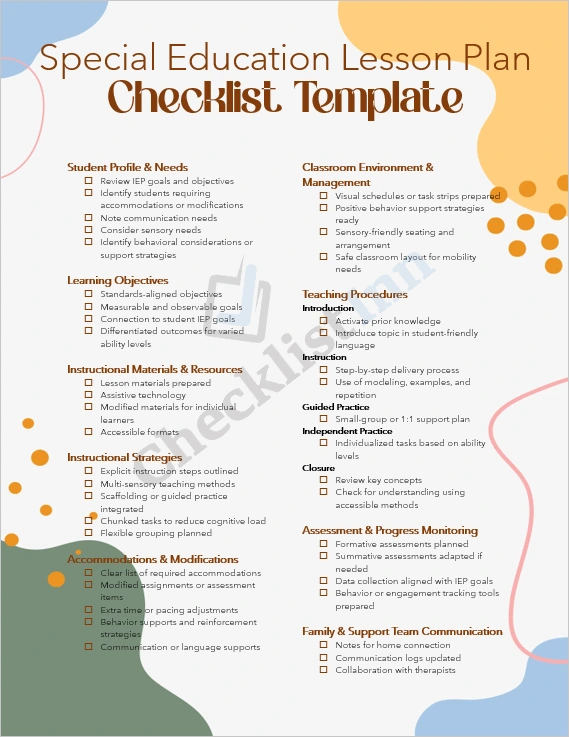
This “Special Education Lesson Plan Checklist” is a streamlined, ready-to-use MS Word template designed for special education teachers, co-teachers, and support staff. It helps you plan, implement, monitor, and reflect on lessons tailored to diverse learners — including students with individualized education programs (IEPs), communication or sensory needs, and behavioural supports.
2. Why use this template?
- Efficiency & consistency – Quickly plug in lesson details and student-specific accommodations; use the same structure each time so nothing is overlooked.
- IEP-alignment – Ensure that learning objectives, accommodations, and assessment methods connect directly to students’ IEP goals.
- Differentiated practice – The checklist supports modified assignments, flexible grouping, scaffolding, and multimodal methods that help meet varied ability levels.
- Reflection & improvement – A dedicated section for post-lesson reflection supports continuous growth and better student outcomes.
3. Who is this template for?
- Special education teachers or resource teachers are working with students receiving accommodations or modifications.
- Co-teachers, paraprofessionals, or support staff assisting in inclusive classroom settings.
- Curriculum coordinators, instructional coaches, or administrators looking for structured planning tools for special education classrooms.
4. What’s included?
- One fully editable MS Word document.
- Pre-formatted headings covering: Lesson Information, Student Profile & Needs, Learning Objectives, Materials & Resources, Instructional Strategies, Accommodations & Modifications, Environment & Management, Teaching Procedures, Assessment & Progress Monitoring, Family & Support Team Communication, and Reflection & Next Steps.
- Check boxes and prompt items to guide your planning and documentation.
- Clean, professional layout compatible with standard school letter-size (8.5” × 11”) or A4 paper.
- 100% editable: change fonts, colors, add logos, adjust any section to suit your school or district.
5. How to use it
- Open the .docx file in Microsoft Word (or compatible software).
- Enter your lesson details — date, topic, student names, IEP goals, etc.
- Use the checklist items as your planning guide; check off each item as you complete or schedule it.
- Customize as needed – remove sections you don’t use, add rows for multiple students, or integrate links to digital resources.
- Save a copy for each lesson to maintain records, review student progress, and help with consistent documentation.
Download now to streamline your lesson planning and ensure every learner’s needs are proactively addressed.
- File Size 533.34 KB