What’s Included
- Fully editable MS Word (.docx) template
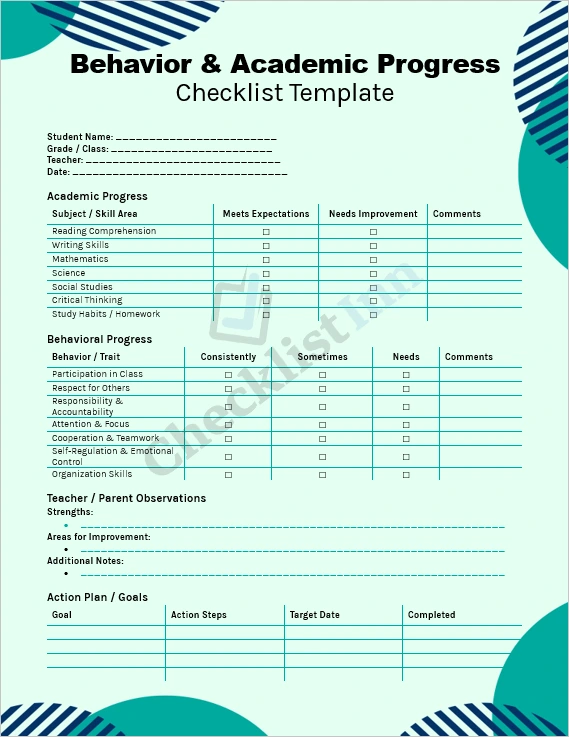
- A structured checklist covering both academic progress and behavioral traits
- Preformatted tables for key areas: subjects, behaviors, teacher/parent observations, and goal-setting
- Instruction section with fill-in prompts, making it easy to use and customize
- Printable format — ideal for class meetings, parent-teacher conferences, or student self-reflection
Why You Need This Template
Keeping track of a student’s academic growth and behavioral development is vital — whether you’re a teacher, tutor, parent, or school administrator. This template helps you:
- Assess holistically: Combine academic performance and behavior in one easy-to-read format
- Identify strengths & areas to improve: The checklist + comment boxes make it simple to note what’s going well and what needs work
- Set actionable goals: The action plan section helps track and follow up on improvement targets
- Improve communication: Provide clear, documented feedback to students, parents, and other stakeholders
- Save time: Because it’s already professionally structured, you don’t need to build a report from scratch
How to Use It
- Open in Microsoft Word and save a new copy before editing.
- Fill in student details (name, grade, teacher, date) at the top.
- For academic subjects, check whether the student “Meets Expectations” or “Needs Improvement,” and add comments for context.
- In the behavior section, tick how often each behavior is demonstrated, and use comments for examples.
- Use the Observations section to highlight the student’s strengths, challenges, or any extra notes.
- Finally, complete the Action Plan / Goals area — set specific, measurable goals, with action steps and a target date.
- Print or share: You can print the report, email it to stakeholders, or save it digitally for regular tracking.
Why Choose This Template Over Others?
- Tailored for both behavior & academics — many tools separate the two, but this template integrates them, giving a fuller picture of student progress.
- Professional & clean design — no clutter, just clear tables and structured fields, making it easy to read and use.
- Flexible & customizable — designed in Word so you can adapt it to your specific needs (add/remove sections, change wording, etc.).
- Cost-effective — saves time and money compared to building a similar tracker from scratch.
How to Download
- Complete your purchase.
- You’ll receive a link to download the file, containing the Word document.
- Download the file.
- Open the .docx in Microsoft Word, save a copy, and start editing.
- File Size 822.40 KB