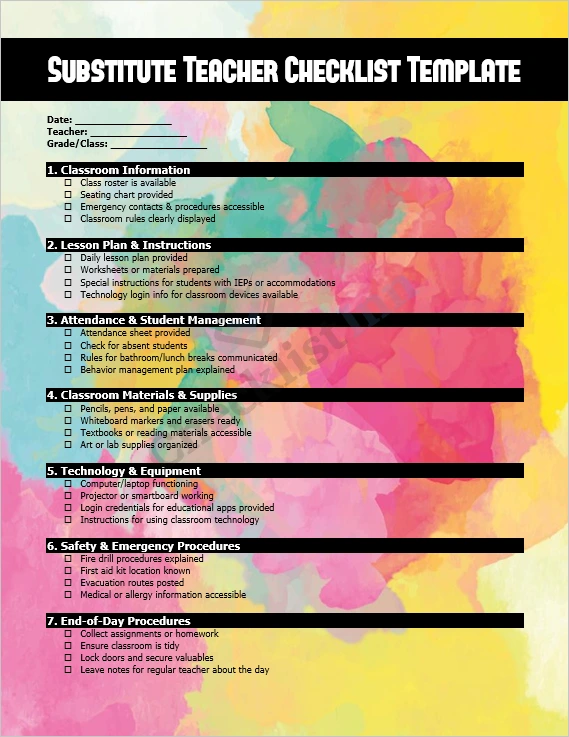
The Substitute Teacher Checklist Template is a ready‑to‑use Microsoft Word document designed to help substitute teachers stay organized, prepared, and professional — even when stepping into unfamiliar classrooms. The template provides a comprehensive checklist covering everything from classroom setup and lesson plans to attendance, safety procedures, and end‑of‑day wrap-up.
Whether you’re a seasoned sub or new to the role, this checklist ensures you have all the essential information at your fingertips. Use it as a printed sheet or a digital guide — simply fill in the blanks, check off items, and you’re ready to go.
Who is this template for?
This template is ideal for:
- Substitute teachers covering classes at short notice.
- School administrators or regular teachers prepare ready‑to‑go instructions for substitutes.
- Educational institutions are aiming to standardize substitute procedures across classes.
- Anyone needing a structured, easy-to-follow plan to maintain classroom continuity and professionalism in an unexpected teacher absence.
Why use this Substitute Teacher Checklist?
- Complete preparation: The checklist covers classroom info, lesson plan readiness, student management, classroom supplies, technology setup, safety protocols, and end-of-day procedures — ensuring nothing is overlooked.
- Time‑saving and efficient: With all essential tasks listed, you can get a day’s work organized in minutes rather than scrambling every time.
- Professionalism & consistency: Helps maintain a stable learning environment, even in the absence of the regular teacher, making a positive impression on school staff and students.
- Customizable and flexible: The template is fully editable. You can tailor sections to your school’s needs, add notes, or adapt to different class levels.
What you get when you download
- A Microsoft Word (.docx) file — ready to edit and print.
- Preformatted sections with headings, checkboxes, and blanks for dates, teacher names, class info, etc.
- Flexibility to modify fonts, colors, add or remove fields, and adapt to your classroom context.
- A practical, printable checklist that serves as a reliable aid for substitute teaching duties.
How to use
- Click the Download button to get the Word file.
- Save the template to your computer.
- Open the file using Microsoft Word (or a compatible word processor).
- Fill in the class information (date, teacher, class, etc.).
- Print a hard copy or use it digitally.
- Use checkboxes throughout the day to mark completed tasks.
- At day’s end, leave notes for the regular teacher — what was done, what needs following up.
Thank you for choosing the Substitute Teacher Checklist Template — we hope it helps you stay organized, efficient, and confident every time you step into a classroom.
- File Size 190.88 KB