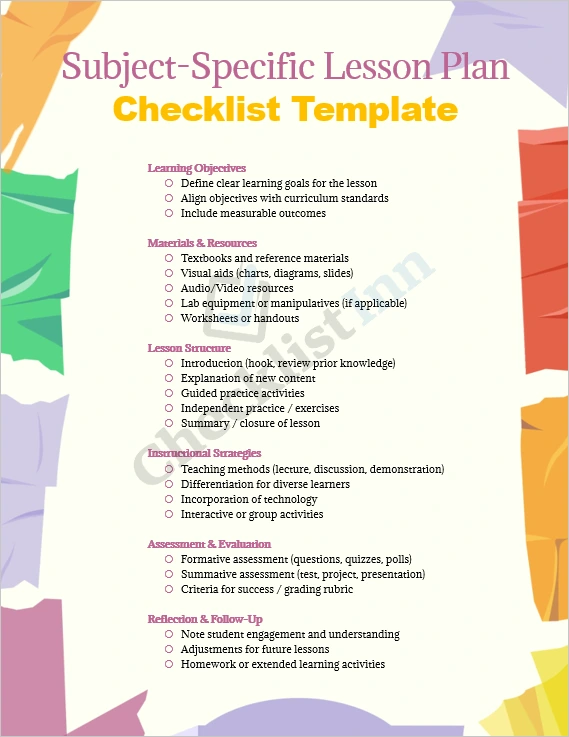
Having a clear, structured lesson plan checklist makes all the difference in delivering engaging, effective lessons. This MS Word template gives you a complete framework to plan any subject, from Mathematics to History, Science to Language Arts—so you spend less time organising and more time teaching.
What’s included
- A clean, professional MS Word (.docx) file you can open and edit with ease.
- Pre‑formatted checkboxes and sections for:
- Lesson details (subject, grade, date, duration, topic)
- Learning objectives aligned with standards
- Materials & resources (textbooks, visuals, audio/video)
- Lesson structure: introduction, explanation, guided practice, independent work, closure
- Instructional strategies (differentiation, tech‑use, group work)
- Assessment & evaluation (formative, summative, success criteria)
- Reflection & follow‑up (student understanding, next steps, homework)
- Fully customisable: change text, fonts, colours, and add your own school logo or branding.
- Ready for reuse across your lessons: just duplicate and adapt for each topic.
Why this template matters
- Saves you time: Jump straight into planning without building a checklist from scratch.
- Keeps your lesson focused: Every section aligns with best‑practice planning frameworks.
- Supports quality teaching: With neatly organised parts, you cover all key elements—objectives, materials, activities, assessment, and reflection.
- Versatile across subjects and levels: Whether a senior secondary Biology lab or a primary‑school Social Studies module, this template adapts easily.
- Promotes consistency: Use the same structure across your lessons so students and colleagues recognise the flow—and you can reflect and improve.
How to use it
- Download the .docx file.
- Open in MS Word (or compatible editor) and save a master copy.
- Fill in your lesson details and tailor the sections to your subject and students.
- Copy the template for each lesson in a unit—modify headings, materials, and activities accordingly.
- After the lesson, use the “Reflection & Follow‑up” section to note what worked, what needs adjustment, and plan next steps.
Equip yourself with a reliable, professional lesson‑planning tool and stay organised, focused, and effective. Download the template now and start planning your next subject‑specific lesson with confidence.