Streamline Student Assessment & Track Growth with Ease
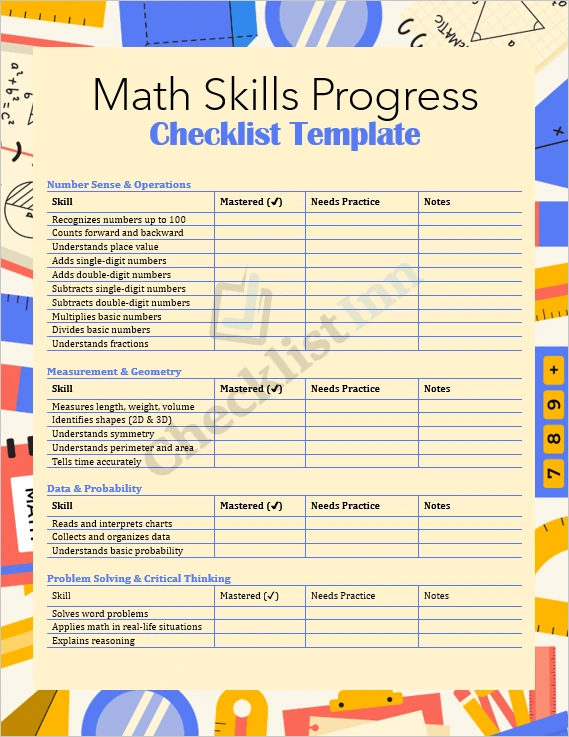
Does tracking math skills feel chaotic or time-consuming? Our Math Skills Progress Checklist is here to make assessment efficient, transparent, and meaningful. Designed for teachers, tutors, and parents, this fully editable Microsoft Word template helps you stay organized while supporting your students’ development — from counting fundamentals to higher‑order problem solving.
What’s Inside
- Comprehensive Skill Categories: Includes key domains like Number Sense & Operations, Measurement & Geometry, Data & Probability, and Problem-Solving — covering a broad spectrum of math learning.
- Progress Tracking Grid: Mark skills as “Mastered” or “Needs Practice,” and leave notes for specific observations.
- Customizable and Flexible: Use as-is or tailor the checklist — add or remove rows, change wording, or format it to match your classroom style.
- Printable & Digital Ready: Designed for digital use (fill in on a computer) or printing for offline record keeping.
- Notes Section: Includes a space for general observations and action plans.
Why Choose This Template
- Save Time — Create one checklist that works all year. No more re-typing or reinventing the wheel.
- Track Progress Visually — See growth at a glance, and easily identify areas needing reinforcement.
- Engage with Clarity — Use the notes section to personalize feedback for each student, making parent-teacher discussions more focused.
- Professional & Clean Design — A polished format that conveys care and clarity, suitable for academic settings.
- Build Consistency — Use the same tool across students and terms, giving you consistent data on skill mastery.
Who This Is For
- Teachers (elementary, middle school) who want a practical way to monitor student math development
- Tutors who need a structured framework to guide weekly or monthly sessions
- Parents / Homeschoolers striving to track their child’s progress and highlight gaps or successes
- Special Educators who benefit from a simple, trackable tool to document mastery or target interventions
How to Use It
- Download the Word file immediately after purchase, and open it in Microsoft Word (or any compatible word processor).
- Customize it to suit your class or students: adjust the skill list, change column headings, or add your own notes.
- Distribute: Print for physical record-keeping or share the editable Word doc to be filled out digitally.
- Review & Update: Regularly revisit the checklist to track changes, record observations, and set new goals.