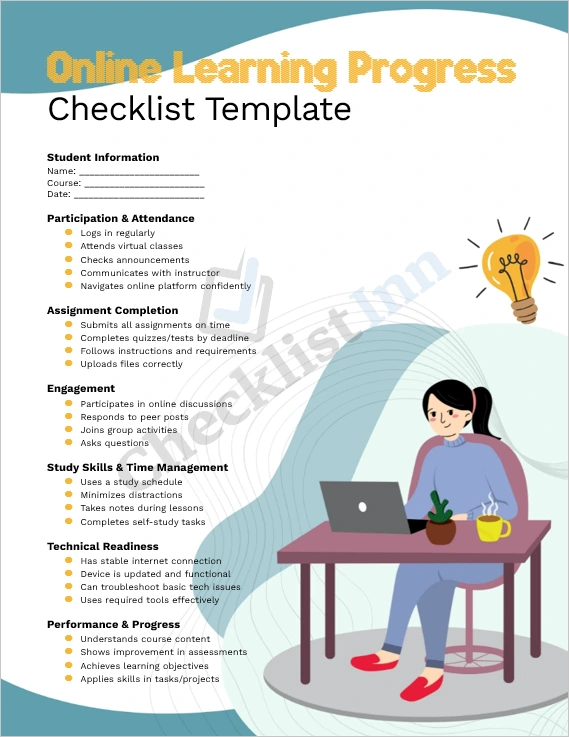
This Microsoft Word template provides a comprehensive Online Learning Progress Checklist designed to help students, teachers, and administrators easily track and evaluate a student’s engagement, readiness, and performance in a virtual learning environment.
Key features include:
- Structured Monitoring: Sections for access & participation, assignment completion, engagement, self-study habits, technical readiness, and learning outcomes.
- Flexible Format: Built with checkboxes, tables, and rating scales so you can adapt it to your workflow.
- Editable in Word: Fully customizable — change fonts, colors, headings, or content as needed.
- Easy to Use: Designed especially for online education settings (LMS, Zoom classes, e-learning) to give a clear, at-a-glance view of student progress.
- Actionable Feedback: Includes a summary and action plan area for instructors or mentors to note next steps, strengths, and areas for improvement.
Who Can Use It / Use Cases
This template is ideal for:
- Students who want to self-monitor their progress and stay organized.
- Teachers or Instructors, to keep track of student participation and performance in online courses.
- Tutors/Mentors, for guiding learners through structured weekly or monthly check-ins.
- Educational Administrators, to audit student engagement or readiness for remote learning.
Use it to:
- Evaluate weekly or monthly learning progress.
- Facilitate parent-teacher or student-teacher conferences.
- Identify at-risk students who may need extra support.
- Document progress as part of an e-learning program or blended learning initiative.
What’s Included in the Download
When you download this template, you’ll receive:
- A .docx file, formatted for Microsoft Word (compatible with Word 2016, 2019, Microsoft 365, etc.).
- Pre-formatted checklist sections with placeholder text and tables.
- Instructional comments (optional) explaining how to use or customize each section.
- Action Plan Summary Section to create next-step recommendations.
How to Use / Customization Tips
- Open the template in Microsoft Word.
- Replace the placeholder text (like “Student Name” or “Course”) with your own details.
- Modify the sections: add or remove checklist items as per your course or structure.
- Customize visual styles: change fonts, colors, or add your branding.
- Use “Save As” > “Word Template (.dotx)” if you want to reuse this as a recurrent form. (Word supports this via its template saving function.)
- Once filled, you can print the checklist or save it as a PDF to share with students or colleagues.
Benefits / Why Use This Template
- Saves Time: Use a ready-made, well-designed structure rather than building your own from scratch.
- Improves Clarity: Gives both students and teachers a clear view of progress areas.
- Encourages Accountability: Helps students stay on track and helps instructors intervene early.
- Professional Appearance: Clean layout that’s easy to read, edit, and present.