Download “Student Engagement Checklist Template (.docx).”
What is this template?
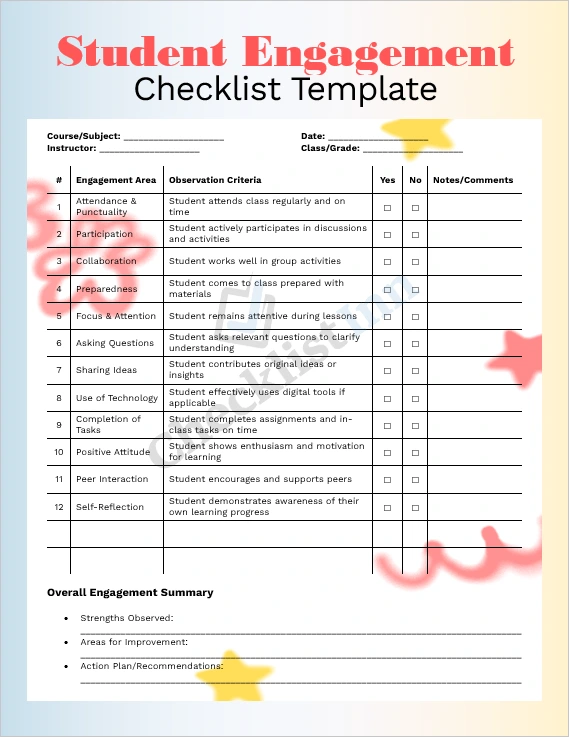
The Student Engagement Checklist Template is a ready-made Microsoft Word document designed to help teachers, instructors, or facilitators track and improve student engagement in any learning environment — whether in-person, hybrid, or online. The template provides a structured checklist covering key engagement areas like attendance, participation, preparedness, collaboration, and self-reflection.
It saves you time: no need to build a chart from scratch — just download, open in Word, and start using or customizing immediately.
What’s included in the download
- A fully editable .docx file — ready for Word (or any compatible word processor).
- A ready‑to‑use checklist with pre-defined engagement criteria and placeholder fields for class, date, instructor, etc.
- A clean and professional layout (tables and headings) for easy printing or digital use.
- A summary section for strengths, improvements, and action‑plan notes.
- Instructions and suggestions for use (in-class, online, group work, individual reflection).
Who can benefit from this template?
- School teachers at any level (primary, secondary, tertiary) are looking to monitor student engagement.
- Online or hybrid course instructors.
- Tutors, trainers, workshop facilitators, or coaching professionals.
- Educational institutions and administrators who want to standardize engagement tracking across classes.
- Anyone wanting a simple, structured tool to assess and encourage active learning and participation.
Why use this template?
- Save time & effort — avoid building a checklist from scratch.
- Consistent tracking — standard criteria help compare engagement across sessions or students.
- Flexible use — customizable to fit different teaching styles, class sizes, and formats.
- Facilitates feedback & improvement — the notes and summary section help document observations and plan follow‑up actions.
- Print or digital ready — use on paper or digitally (for hybrid/online classes).
How to download & use
- Click the “Download” button/link to get the
.docx file. - Open in Microsoft Word (or any compatible word processor).
- Fill in class information (Course, Date, Instructor, etc.).
- For each observation session, check “Yes” or “No” against each engagement criterion, and add notes if needed.
- Use the “Overall Engagement Summary” block to highlight strengths, areas for improvement, and action plans.
- Save as a new file or export as a PDF if you prefer to share or print it.