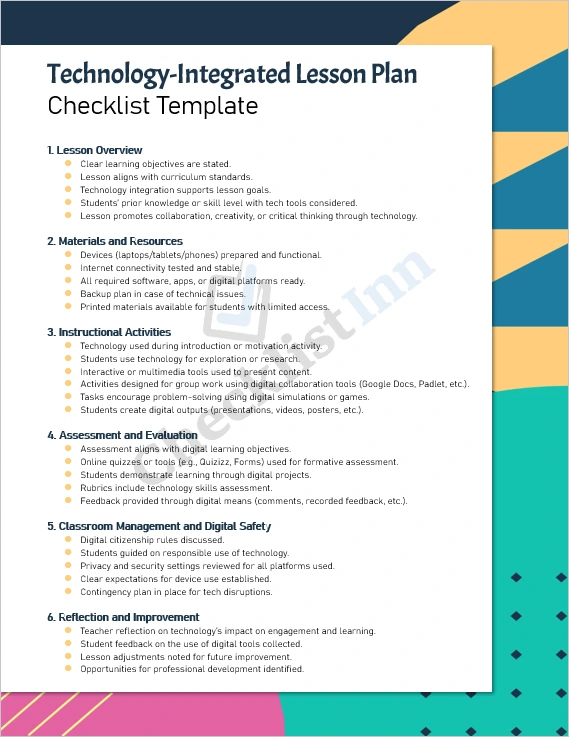
A ready-to-use Microsoft Word checklist template designed to help teachers plan and deliver lessons integrating digital tools effectively. Ideal for educators aiming to blend pedagogy and technology seamlessly.
What’s Included:
- A fully editable MS Word (.docx) checklist document
- Pre-formatted sections aligned to best practices in technology-enhanced instruction
- Clear checklist items under key headings: Lesson Overview, Materials & Resources, Instructional Activities, Assessment & Evaluation, Classroom Management & Digital Safety, Reflection & Improvement
- Space for teacher name, grade/subject, date, lesson title, duration, and technology tools used
- Printable format so you can use it digitally or on paper
Why You’ll Love It:
- Saves you time: jump-start your planning rather than creating from scratch
- Ensures thoughtful use of technology — beyond “device for device’s sake”
- Keeps you focused on learning outcomes while embedding tech in meaningful ways
- Supports consistency: use across lessons, units, or year-long planning
- Flexible: customise headings, items, and language to suit your context and preferred tech tools
Who Is This For?
- Classroom teachers (any subject) who want to integrate digital tools in a structured way
- Instructional coaches and tech-integration specialists supporting other teachers
- School administrators seeking a common template for technology-rich lesson planning
- Pre-service or in-service educators looking for a professional planning resource
How To Use It:
- Download the .docx file and save it to your preferred folder.
- Open in Microsoft Word (or compatible editor).
- Fill in the header fields: teacher name, grade/subject, date, title, duration, and technology tools.
- Review each checklist section and tailor or add items as needed (e.g., specific platforms your school uses).
- Use the checklist as you plan the lesson, checking off items as you confirm them.
- After the lesson, reflect using the “Notes” section and make adjustments for next time.
- Save a copy (version by version) to build a record of lessons with tech-integration fidelity.