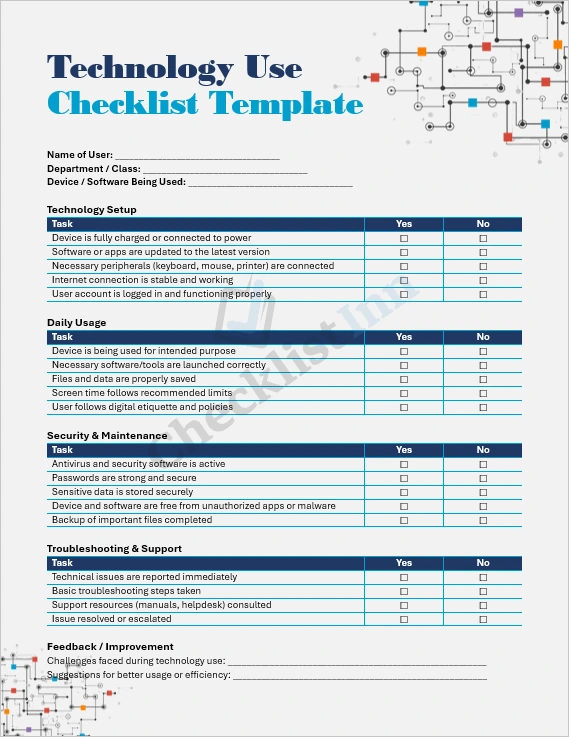
This is a fully editable Microsoft Word (.docx) template designed to help educators, managers, or IT coordinators monitor and manage technology use in their organization. The “Technology Use Checklist” allows you to track device setup, daily usage, security, troubleshooting, and user feedback in an organized way.
Who Is This For?
- Teachers & School Administrators — to ensure students and staff are using devices safely and efficiently
- Business Managers — to monitor how employees use computers, software, and peripherals
- IT Professionals — to maintain oversight of device health, security, and usage trends
- Remote Teams — to standardize how technology is used across remote workers
Key Features & Benefits
- Pre-formatted tables with checkboxes for easy daily or weekly tracking
- Separate sections for setup, security, maintenance, troubleshooting, and feedback
- Notes fields to document recurring issues or suggestions
- Signature area for accountability (user and supervisor)
- Flexible & customizable: You can adapt it to your own device policies, tools, and workflows
Why Use This Template?
- Saves time: you don’t have to build a checklist from scratch
- Promotes consistency: everyone uses the same structured checklist
- Enhances accountability: built-in signature lines and feedback sections
- Helps prevent issues: by tracking setup and security, small problems can be identified before they become big ones
- Supports data-driven decisions: notes and feedback can highlight where technology policies or training may need improvement
How to Use It
- Download the file in
.docx format. - Open in Microsoft Word (or compatible software).
- Customize the template if needed — add or remove rows, change titles, or adjust layout.
- Distribute it to your team, class, or staff members.
- Ask users to fill it in daily, weekly, or monthly, depending on how intensively devices are used.
- Collect and review the checklists to identify patterns, recurring problems, or training needs.